Having a corporate CV template opens the way for a great first impression among potential clients. Presenting your company in a professional and consistent way has become essential in this competitive market. The corporate CV template used by your team plays, of course, a big role in it. But how do you know your template is the most suitable to promote your services? We share with you the best practices, based on our years of experience creating templates for tech companies.
1. Show your brand personality and be consistent
Every document created should follow your company’s brand guidelines – this is valid for both internal and external documents. Corporate CV templates are no exception: creating a design that is consistent with your brand is essential, including your logo and the right colors. When you do rebranding, remember to update this document too.
2. Have an editable version
We have seen companies having trouble editing PDFs when there is the need to add or update something. Our recommendation is to always have a Word version of each CV and then save it into PDF.
3. Avoid the quick and dirty solutions
Lots of times, companies choose “quick and dirty” solutions for their corporate CV templates. This means that something that worked one time because you were on a deadline, it’s not necessarily the best option. It’s better to spend some time creating a CV template that can easily be applied. Remember those days when you have to update more than 5-10 CVs (outsourcing companies). Makes more sense to have a functional and effective template ready to update, right?
4. Add a summary page
Let’s be honest: you need to get your potential client’s attention in seconds when they look at your consultants’ CV. Adding a summary on the first page, by highlighting your consultant’s skills and experience in a brief text, could do wonders for your team to get an interview.

5. Use Microsoft Word native features
We have selected some advice on how to better use Microsoft Word native features to simplify your process of creating and maintaining the CVs correctly formatted.
- Use tables instead of text boxes: Text boxes in Word are a big mess. You lose so many features and it makes it harder to be processed by other software like OpenOffice and GoogleDocs. For the following example, more than 5 text boxes were used. In reality, a single table with 2 lines and 2 columns could easily solve it.

- Avoid hardcoded images: Many times we see clients hardcoding images in the background to create visual effects on the text. As soon as the text changes, the image is not aligned with the text anymore. There are plenty of other ways to do this properly that adapts dynamically to the text;
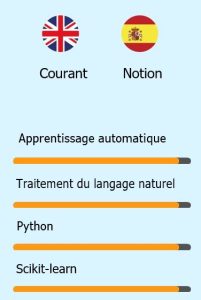
- Take advantage of the headings and text types: By configuring correctly the headings (like 1,2,3) and text normal and bold for the different kinds of text, you can easily improve the design and make sure that all the text is consistent, same font, size, etc.
- Use tabs and idents correctly: By using the tabs and idents function on Word, you can do great things and even mimic tables, but having all the benefits of using simple text. Editing tables can be annoying, sometimes Word takes behaviors that can drive you crazy.
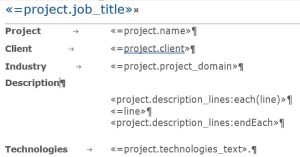
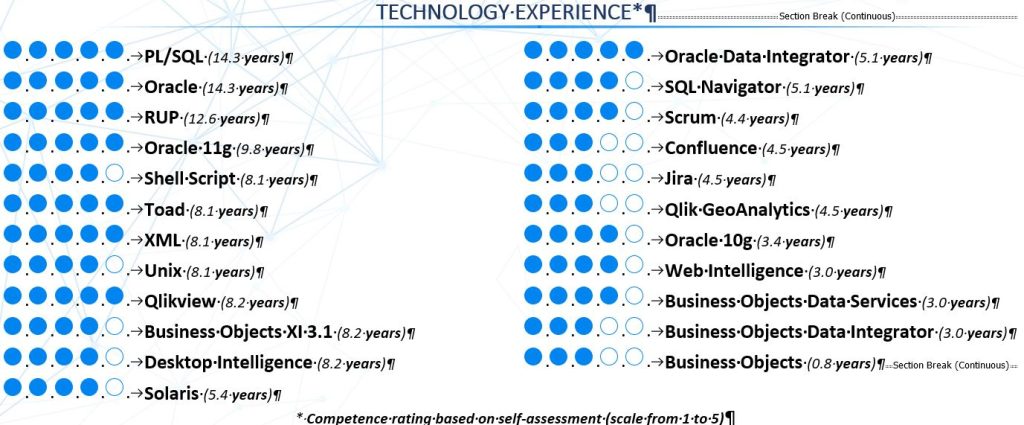
- Explore sections and columns: Word provides some nice features with Sections and columns, that make it easier to maintain. For example, if you wish to display things like competencies, displaying them using two columns is a great solution. If you wish to have separated headers for specific pages with the same title, creating a new section and defining a new header for those sections is also a good idea.
5. Use software that helps you generate CVs automatically
Many companies create and update CVs manually, which is a huge burden for the organization and it quickly becomes a bottleneck. For those reasons, we advise companies to automate this process as much as possible. These are some of the benefits of using Sprint CV software:
- Data pre-parsing that loads any file in seconds: Sprint CV has one of the most advanced CV parsers that can help your organization to prepare CVs in seconds. We load any single CV format like (Word, PDF, LinkedIn, Europass, etc) and pre-load all the data.
- Store all CV data in your database: One of the big problems of CVs is that information stays stored in a file, Word or PDF, and not in your database. When you need to search for a candidate, it becomes an issue. With Sprint CV you can validate all the data of the CV and you store it directly in a database to be used anytime.
- CV Generator that generates CVs in seconds: Whenever needed, just select a specific employee or candidate and generate their CV in a specific corporate CV template in less than 30 seconds. You will get a perfect CV in your own template.
- Multiple CV templates: Many times clients demand specific CV templates or in different languages. With Sprint CV you can easily have a portfolio of CV templates. The system will automatically adapt the data of the consultant to the desired template on each occasion.
- Multiple language and multiple profiles: Allows you to manage multi-profiles in different languages;
- Real-time experience calculation: On each professional experience, we detect the stack used, industry, roles, etc. All the metadata will be, later on, enriched with real-time calculations of time of experiences (industry experience, roles, technologies, etc).
- Real-time analytics and search: of the candidates with the skills you are looking for with several filters that simulate a job description;
Sprint CV – Schedule a demo and enjoy our 30-day free trial
 Spending less time managing CVs and more time growing is one of the best things you can do for your business. By having an efficient CV management solution, you will boost all your company operations.
If you are interested, schedule a demo of Sprint CV, we will add your corporate CV template and we are offering a 30-day free trial of Sprint CV. We want your company to thrive, even more, having efficiency alongside them in all areas. Please reach out to our founder Marco Pincho on Linkedin or via e-mail.
By the way, can you recommend us to your company?
If you are a recruiter or consultant and feel Sprint CV could boost your company’s performance, our referral program will definitely interest you. If you recommend us to a company and we close the deal, the first four monthly subscriptions will be given to you as a bonus, which can be up to 1600€! (The price of four months of Enterprise subscription). Are you up for it?
Frequently Asked Questions
What makes a good corporate CV template?
It follows the company's brand guidelines, stays consistent across every consultant, opens with a short summary of skills and experience, and is built with native Word features so it remains easy to edit and convert to PDF.
Why should corporate CVs avoid text boxes in Word?
Text boxes break editing, flow badly between pages and are hard for other software to process. Tables, styles and Word's column feature give the same layout while keeping the CV editable and machine-readable.
Should consultant CVs be sent as Word or PDF?
Keep an editable Word master for every CV and export it to PDF when sending. Editing PDFs to add or update information is slow and error-prone.
How can a consulting firm apply its CV template to every consultant automatically?
Store consultant data in a CV management system and generate each CV from it in the corporate template. Sprint CV loads the company's own template and produces formatted CVs in seconds instead of manual copy-and-paste.